Key takeaways
- GEO sits on top of SEO. If your pages aren't crawlable and useful, there's nothing for an AI system to summarize
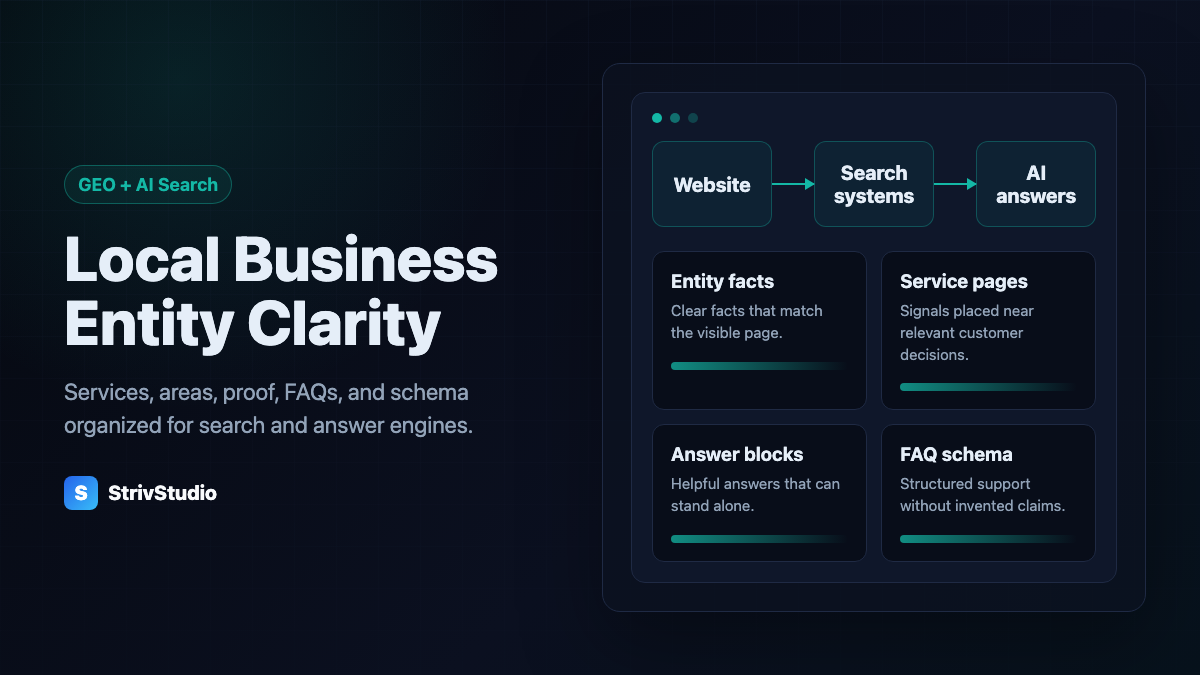
- AI answer engines need the same facts everywhere: what you do, where you work, how you price, and what proves it
- Short answers, FAQs, comparisons, and process steps make a page easy to quote
- Schema describes what's already on the page. It never adds claims the page doesn't make
5 free fixes to help AI find your business
Start with one service you want more customers for. Work through these checks on that page, then move to the next. You can read, copy and download the checklist for free.
1. Say what you do and where
Open your homepage on your phone. Can a new customer tell what you offer and where you work without guessing?
Before: “Quality you can trust.”
Clearer: “Drain cleaning in Fairfield, NJ.”
Use the service and towns you actually cover. The plumbing headline is an example, not a claim about a client.
2. Answer three questions customers ask before booking
Look through recent inquiries. Pick three questions that come up repeatedly and answer them on the relevant service page. Useful starting points are what affects the price, what is included and how booking works.
Write your actual policy. If you quote each job individually, explain the factors you check. You do not need to invent a starting price or promise a turnaround you cannot meet.
3. Show a real job and explain it
Add one relevant photo from your own work, with permission to share it. Give it a plain caption that says what the photo shows. “Furniture wrapped before loading” is more useful than “Another happy customer.” Include a town only when it is accurate and appropriate to share. Keep customer addresses and other private details out.
4. Check your Google Business Profile
For an eligible local business, check the services, hours, phone number and website on your Google Business Profile. Correct anything out of date, and make sure your website describes the same business. Google specifically recommends keeping business information current for its AI search features.
5. Check whether Google can see the page
- Open Google Search Console and choose your website. If it is not set up, follow Google's ownership-verification instructions or ask whoever manages your site for access.
- Paste the full address of your main service page into the inspection bar at the top.
- Read the indexing result. If it says the page is not on Google, open the explanation. The result may describe an access problem or a different page Google selected as the main version.
- After a relevant fix, use Test live URL. Request indexing if the corrected page is eligible. Google decides whether to index the page and include it in an AI answer.
Search Console is free, but you need access to the website's property. This checks Google; it does not measure every AI search service. Google's URL Inspection guide explains the possible results.
A writing prompt you can copy
Use this with an AI assistant you already have, or answer the questions yourself:
I run [business name]. We provide [service] in [actual service area]. Help me answer three questions customers ask before booking. First ask me for our real pricing factors, what is included, how booking works, and any limits or exclusions. Then write three short question-and-answer sections for the service page. Use only facts I provide. Ask about missing details. Do not invent prices, locations, reviews, credentials or guarantees. Keep the wording plain enough for a customer to understand on their phone.
Read the answers before publishing. You know your business's policy; an AI assistant does not.
What these fixes can do
They give customers and search systems clearer, more useful information. Google's AI search guidance emphasizes helpful firsthand content, accurate business information and normal search fundamentals. None of these checks guarantees a ranking or AI recommendation. The checks need no paid software; resolving a technical problem may take further work.
Pick one change and make it today. The rest of this guide explains the foundations in more detail.
Short answer: GEO optimization means making your business easy for AI answer systems to read accurately. For a contractor or home-service company, that's clear service pages, the same facts everywhere, direct answers, real proof, and schema that matches the page.
GEO builds on SEO, it doesn't replace it
Generative engine optimization gets sold as a new channel. For a local service business it's simpler than that: make your website the clearest source of verified facts and useful answers about your company, so that when an AI system goes looking, it finds something worth repeating.
Traditional SEO still applies. Pages need to be crawlable, fast, indexed, linked to each other, and useful to a real customer. Google's own Search guidance still comes down to helpful, reliable, people-first content, and GEO doesn't get you out of that. It raises the bar on clarity.
Think of it this way. SEO gets you found and evaluated inside search. GEO makes your facts and answers easy to interpret once you're found. What an answer system then does with them is out of your hands.
The facts AI systems need from you
A lot of local business sites are vague in exactly the places where a customer, or a machine, needs precision. "We handle all your home service needs" says nothing. Which services? Where? What happens when I call?
A GEO-ready page makes these obvious:
- Who you are: the exact business name, website, how to reach you, and a plain description of the brand
- What you do: the specific services people search for, not broad categories
- Where you work: cities, towns, neighborhoods, and any real limits on that
- Proof: reviews, project photos, credentials, years in business, portfolio examples, as long as they're real and verifiable
- Process: what happens after someone calls, asks for a quote, or books
- How you price: quoted per job, fixed price, subscription, or inspection first
Our GEO and AI search optimization work starts with this fact layer, because vague content can't become a reliable answer no matter how it's marked up.
Answer blocks make pages easier to use
A self-contained paragraph that answers one question is easy for a person to scan and easy for a machine to lift. Answer the common questions directly, then explain the details underneath.
Sections that do this well:
- A short answer block at the top of high-intent pages
- FAQs with one clear answer per question
- Comparison sections that say when one option fits better than another
- Cost factors that explain what moves the price, without inventing exact numbers
- Step-by-step process sections for quotes, inspections, service calls, and follow-up
Human visitors skim for exactly the same things before deciding whether to keep reading, so none of this is work you do for the machines alone.
Schema describes the page, it doesn't invent one
Schema markup helps search systems understand a page. It should never claim something the page doesn't show. If the page has visible FAQs, FAQ schema can reinforce them. If a service page clearly describes an offer, Service schema can reinforce that.
What you don't do is add fake reviews, ratings you can't back up, service areas you don't cover, or credentials you don't hold. That isn't GEO. It's a trust problem waiting to surface.
The types that usually apply are Organization or the right LocalBusiness subtype, WebSite, Service, BlogPosting, BreadcrumbList, and FAQPage, where the visible content and current search guidelines support them. Use only the types and properties that accurately describe what's on the page.
Your Google Business Profile still matters
For a local business, GEO and local SEO draw on the same truth. Your website and your Google Business Profile should describe the same company, the same services, the same categories, and the same locations. When the profile says one thing and the site says another, customers and search systems both have less reason to trust either.
That's why Google Business Profile optimization shouldn't be handled separately from the website. Profile, service pages, reviews, photos, and business facts should all back each other up.
What to do first
If your site isn't ready for this, don't start by publishing dozens of articles. Start with the pages closest to revenue.
- Make the homepage say what you do, who you serve, and how to reach you.
- Build or fix the core service pages people actually search for.
- Add service-area context without turning pages into city-name swaps.
- Answer the common buying questions directly.
- Add schema that matches the visible content.
- Link related pages together so the site's structure is obvious.
That's the foundation. Articles, genuinely useful service-area pages, and monitoring come after. Results still depend on your market, the quality of the content, technical access to the site, your reputation, and how each search or answer system happens to behave. For the groundwork underneath all of this, our local SEO guide is the place to start.
For a moving company, start with the mover-specific AI search checklist. Our moving company SEO service connects those answers to service pages, business facts and inquiry reporting.
FAQ
Is GEO different from SEO?
A little. GEO is the label people use for making content clearer and easier for AI answer systems to interpret. It builds on crawlable, useful pages. It doesn't replace them.
What should a local business fix first for AI search?
Consistent business facts, clear service pages, visible service-area information, FAQs, schema that matches the page, and proof: reviews, photos, credentials, and project examples.
Will GEO get my business into AI Overviews or ChatGPT answers?
Nobody can promise that placement, and be wary of anyone who does. The realistic goal is to be the clearest, best-supported source when an answer system compares local options.