Key takeaways
- Map one primary destination to each distinct service or customer decision.
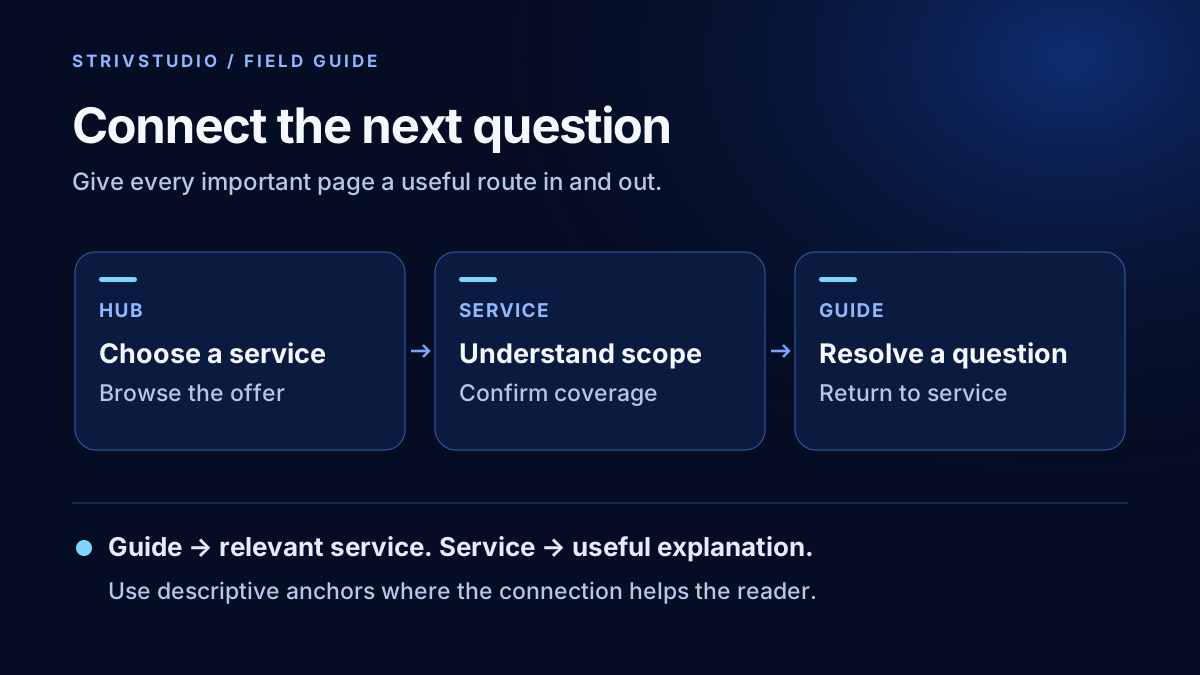
- Connect guides to relevant services and services to useful supporting explanations.
- Use descriptive anchors and ordinary crawlable links that explain their destinations.
- Audit incoming links, redirects, anchors and destination usefulness after publication.
Internal linking connects the pages on your own website so customers can move from a question to the service or evidence they need. For a service business, start with clear service destinations, connect relevant guides and coverage pages, and check that important pages have useful incoming links. Every link should have a reason a person would follow it.
A new blog article is not fully integrated just because it appears in a sitemap. It needs a place in the site's browsing structure and a sensible next step. Our SEO content writing service includes page intent and linking decisions alongside the article brief.
What should your internal-link map contain?
Make a spreadsheet with URL, page type, primary intent, parent hub, related service and useful supporting pages. Use the actual public URLs. A page list based only on navigation misses articles, retired routes and pages that were published but never linked.
For an illustrative HVAC company, the service hub may connect to AC repair, AC installation and maintenance. The repair page may link to a guide explaining what information to give the office. A genuine coverage page can connect to the relevant services, while those services can link to the coverage hub where customers can confirm their area.
| Starting page | Helpful destination | Reason to connect them |
|---|---|---|
| Service hub | Specific service | Help customers select the right job type. |
| Service page | Detailed comparison guide | Explain a decision without overloading the service page. |
| Guide | Relevant service | Offer help when the reader is ready to discuss that problem. |
| Coverage hub | Useful local page | Confirm real coverage and local details. |
Use the map to spot competing destinations. If two pages do the same job, decide whether one should be improved or the pair consolidated. Our service-area page guide helps make that decision for location content.
Where should contextual links go?
Place a link where the reader reaches the relevant question. A paragraph explaining what a replacement estimate includes can point to the installation service. A section about coverage can point to the service-area hub. Do not insert a service link into an unrelated sentence simply to increase a count.
Give the destination enough context to be useful. “See our AC installation process” tells the reader what to expect. “Click here” depends on nearby wording and becomes unhelpful when read alone. Long chains of adjacent links make a sentence harder to follow; separate the ideas when each deserves explanation.
Google's link guidance recommends crawlable anchor elements with an href and descriptive, natural anchor text. It also says there is no magical ideal link count. Use that guidance to support a readable page, not a mechanical quota.
How do you avoid overlinking and forced anchors?
Read the article aloud without following any links. If the sentence sounds like a list of search phrases, rewrite it. The destination should remain clear without repeating every service and town name. Link the idea when it first becomes useful, then repeat only if a later section gives the reader a different reason.
For example, a roof-estimate guide might link “roof replacement assessment” to the replacement service. It does not need the anchor “best affordable roof replacement company in every nearby town.” Keep navigational labels short and stable so visitors learn what they mean.
Avoid hiding extra anchors in tiny text or adding unrelated service lists to every article. Prefer a short, relevant set of next steps. The content planning guide includes a brief field for both the destination service and the existing pages that should link to the new guide.
What should menus and the footer do?
Navigation should make the main services, industries, guides and contact route easy to find. A footer can repeat the most important destinations and business details consistently across page templates. Check more than the homepage: a separate article or industry template may have its own footer.
Do not put every minor article into the main menu. Give visitors a browsable guide hub with useful labels. Keep legal and contact destinations identifiable. Where an anchor points to a contact section, verify that the section exists on the destination page and that the fixed header does not obscure it.
On mobile, check menu opening, keyboard focus, link labels and closing behavior. A crawler finding a link does not prove the navigation is comfortable for a visitor. Treat technical discovery and actual browsing as separate checks.
How do you audit the links after publishing?
- Crawl the public pages and compare the inventory with the sitemap and content registry.
- Count incoming internal links and investigate pages with none.
- Follow each new link and confirm the destination answers the promise in its anchor.
- Replace links through redirects with the final relevant URL where appropriate.
- Check heading fragments, deleted pages and accidental links to preview domains.
- Open representative pages on a phone-sized viewport and use the links by keyboard.
Keep a known broken-link fixture in an automated checker so a green report cannot simply mean the script inspected nothing. Record the pages the crawl covered and any excluded paths. Recheck after redirects or content moves, because a previously sensible link can start pointing to an unrelated destination.
How should you judge the result?
Start with observable outcomes: important pages are reachable, links resolve and the journey makes sense. Then monitor whether relevant pages receive search impressions and visits, and whether customers reach useful service destinations. Do not claim that a link edit caused a ranking change without considering other changes and normal variation.
Clear connections also support an understandable source for AI search. Our AI-search guide covers the broader access and evidence work. If the site has grown without a reliable map, STRIVSTUDIO's technical SEO audit service can identify the structure, redirect and internal-link problems to repair first.